


Café Window Art
Made for shopfronts, cafés, offices & classrooms
- ✓Designed in Australia
- ✓Instant download
- ✓Print A4, A3 or A0
- ✓No drawing skills needed
- Regular price
- $9.96
- Sale price
- $9.96
- Regular price
-
RRP
Buy now, pay it in 4 interest-free instalments
Choose Afterpay
At checkout.
Login or sign up
Free and simple to apply.
Pay it in 4
Approx every 2 weeks.
See your payment schedule for full breakdown of your instalments and due dates in the Afterpay app or web portal after you check out. Your instalments and due dates will take into account your preferred payment date, and whether no payment upfront or higher upfront payment applies.
Late fees, eligibility criteria and T&Cs apply. Australian credit licence 527911.
SKU: WINART-CAFE-DL
Café window art templates, printable download
A café window that gives people a reason to stop, smile and walk in. These 12 templates are more than signs. Each one does a job: a tally that shows how busy you are, a vote your regulars come back to check, a thought bubble that turns the window seat into the photo everyone takes.
Print a template, tape it to the outside of the glass and trace it from the inside with a chalk marker. Trace the outline, fill in the solid letters and you're done. No steady hand or sign-writing skills needed.
What's in the download
12 designs: thought bubble for the window seat, photo spot speech bubble, Coffees poured today tally, Cast your vote (flat white or long black), Coffee level gauge, Today's forecast, Customer of the day frame, Pay it forward tally, Sold out by, To do today, You are here, and Hot or iced coffee day.
Window Playbook: two pages on what each design does for your café, where to paint it and how to run it day to day.
Blank vote board: write in your own two teams. Cheesecake or carrot cake, oat or almond, footy teams.
Normal and mirrored versions of every design. Use the mirrored sheet when you paint on the inside of the glass, so people outside read it the right way round.
Colour guide and shopping list with the uni Chalk colours from our example.
Made to change every day
Tally boxes, tick boxes and write-in spaces are left blank on purpose. Add your marks each day, wipe them off with a damp cloth and start again. A window that changes is a window people keep looking at, and it gives you something new to post each week.
No A3 printer? No problem
You get every design in five sizes:
A3: one sheet per design
A4: the same designs, smaller
2 × A4 pages: tape together for about A3
4 × A4 pages: tape together for about A2, good for small café windows
A0 print-shop file: for big shop windows. A landscape design comes out about 110 × 70 cm
Finished sizes are approximate.
Which markers?
uni Chalk Markers: the PWE-8K chisel tip for A3 and the tape-together sizes (the 8-colour PWE-8K set has every colour in our example), the PWE-5M for A4 and the PWE-17K for A0. They're bright on glass and wipe off with a damp cloth.
White reads best on glass. Add one accent colour, like fluoro pink, and paint each design in a single colour. Always test your markers on a small corner of the glass first.
Two ways to buy
Templates (Printable Download): the instant download. Use the markers you already have.
Templates & Marker Kit: the download plus the uni Chalk PWE-8K set of 8, posted to you. It has every colour in our example. Your templates arrive by email straight away; the markers ship from our Tweed Heads warehouse.
The 8 markers in the kit (PWE-8K, 8 mm chisel tip):
White, Fluoro Pink, Fluoro Yellow, Fluoro Green, Fluoro Orange, Red, Violet and Light Blue
The shopfront photo is an example of the finished look. Preview images are watermarked. Your download is the full-size black line templates, ready to trace.
The Printable Download is a digital product: nothing is posted to you. For use on your own home, classroom or business windows. Please don't resell or share the files. Change-of-mind refunds don't apply to digital downloads. This doesn't affect your rights under the Australian Consumer Law. If a file won't open, contact us and we'll sort it out.
Often ordered together
-
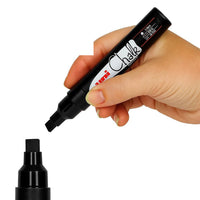 UNI PWE-8K Liquid Chalk Marker Broad Chisel Tip (All Colours Available)
$4.20
ex GST
-
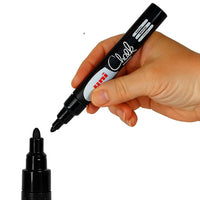 UNI PWE-5M Liquid Chalk Marker Medium Bullet Tip (All Colours Available)
$2.90
ex GST
-
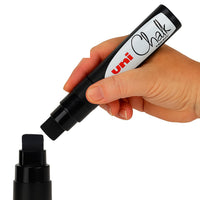 UNI PWE-17K Liquid Chalk Marker Extra Broad Chisel Tip (All Colours Available)
$7.50
ex GST
-
 UNI Liquid Chalk Marker Assorted Colours Chisel Tip Assorted Wallet Of 8
$35.00
ex GST
-
 Black Friday Window Art
$9.05
ex GST
-
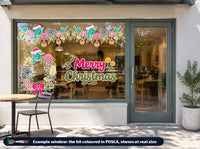 Aussie Christmas Window Art
$9.05
ex GST

Dispatch same business day for orders placed before 11am AEST. Free delivery on orders over $149. 30-day returns on unopened items. Government purchase orders accepted — request a bulk quote.


Specifications
Common questions
Everything people ask us about POSCA before they buy.
Straight after checkout your order confirmation email has a download button. Click it to download one ZIP file with every size, the colour guide and a short guide to which file to print.
Yes. You trace the printed shapes through the glass with a chisel chalk marker: outline first, then fill in the solid letters.
Yes. Every design comes as pages for a normal A4 printer that you tape together: 2 pages make about A3 and 4 pages make about A2. Overlap the grey edge by 10 mm.
Tape the template to the outside, printed side facing in, and paint on the inside where the weather can't reach it. Use the mirrored sheet so the words read the right way round from the street.
The boxes are left blank on the template. You paint the design once, then add tally marks, ticks or a time each day with the same marker and wipe them off with a damp cloth. The Window Playbook in the download explains how to run each one.
Yes. The pack includes a blank vote board in normal and mirrored versions, so you can write in any two teams.
uni Chalk Markers are the easiest on glass and wipe off with a damp cloth. Use the PWE-8K chisel tip for A3 and the tape-together sizes, the PWE-5M for A4 and the PWE-17K for the A0 size. Always test on a small corner of the glass first.
The same download, plus the uni Chalk PWE-8K chisel tip set of 8: White, Fluoro Pink, Fluoro Yellow, Fluoro Green, Fluoro Orange, Red, Violet and Light Blue. It has every colour in our example. The markers are posted from our warehouse.
Change-of-mind refunds don't apply to digital downloads. This doesn't affect your rights under the Australian Consumer Law. If a file won't open, contact us and we'll sort it out.


